Well before competition day
Request an environment
Operational partners and other organisers
Are you an operational partner, or another organiser, and would you like to use the FLLTools scoring system for your (regional) finals?
Please contact us at thijs@flltools.nl so we can discuss what would work best for you. The tool is easy to translate. The initial setup requires a bit more work, since the tool itself needs to be translated. After that, only the yearly updates and seasonal information, such as names and descriptions, need translation.
Regional finals of FIRST® LEGO® League in Belgium, Luxembourg and the Netherlands
The organisers of the FIRST® LEGO® League finals in Belgium, Luxembourg and the Netherlands automatically receive their login details by e-mail at least 1 month before the final. In most cases this is the contact address known to the operational partner. Haven't received anything 1 month before your final? Contact thijs@flltools.nl and we will make sure the details reach you quickly.
School and local events
We love that you want to use our tool! Send an e-mail to thijs@flltools.nl with:
- the date of your event;
- who the initial login details should be sent to.
Because maintaining, hosting and developing the tool isn't free, we ask for a voluntary contribution (so it's not required). Would you like to contribute? Mention it in your e-mail and we'll let you know how.
Decide what you need
FLLTools can do a lot. It has all kinds of features that make organising your regional final easier and automate a lot of work. Not every event needs everything. That's why FLLTools works with modules: parts you switch on or off yourself. This keeps the menus tidy, and you only see what you use. How to switch modules on is explained on the page Settings and modules.
Go through the list below beforehand and decide what you want to use at your event.
Always available
- Teams, rounds and tables: the basis of every event.
- Referee input (Robot Match): referees fill in the score sheet on a tablet or phone. This also works when the internet drops out for a while.
- Scoreboards: a public scoreboard for visitors and an administrative scoreboard for the organisation.
- The timer: the match timer for a big screen.
- Remarks: notes about teams for the judges' deliberation.
- Competition Results: an overview of all rankings the judges can use to decide the awards.
- Exports: judging forms, match lists, judging lists and the export to OJS.
Modules you can switch on
- Judging (Judge Module): judges fill in the rubrics digitally, or paper forms are scanned in.
- Advanced Team Management: coaches receive an invitation to maintain their own team page, team photo and social media links.
- Schedule (Schedule Module): the day schedule for teams, volunteers and the public.
- Schedule generator (Schematic Generator Module): FLLTools automatically creates a day schedule based on your teams, tables, juries and rounds. This now happens directly in the tool.
- Livestream: show the livestream of your event on the public website.
- Custom PDF Templates: design your own documents, such as name cards, table cards or certificates, with the team details filled in automatically.
- Info screens: screens in the venue showing the schedule, who is playing at which table, the timer or the scoreboard.
- Practice tables (Practice Table Reservations): teams book a time slot on a practice table themselves.
- Check-in (Team Check-in Module): keep track of which teams have reported on arrival.
Because FLLTools contains all team names, team numbers and organisation details, exports and screens can be made quickly and without mistakes. Especially at large events this saves a huge amount of manual work.
Custom work
Missing something? Some features need a bit of custom work. Depending on the size of the job, we may ask for a small voluntary contribution. This is a one-off, because the code becomes part of FLLTools. That way other organisations can use it too, and so can you next year. Contact thijs@flltools.nl about this.
Logging in and finding your way around
This page explains how to log in to FLLTools and how to find your way around the tool. In the instructions we use the link yourevent.flltools.nl. Replace "yourevent" with the name of your event.
Logging in
Go to https://yourevent.flltools.nl/login.
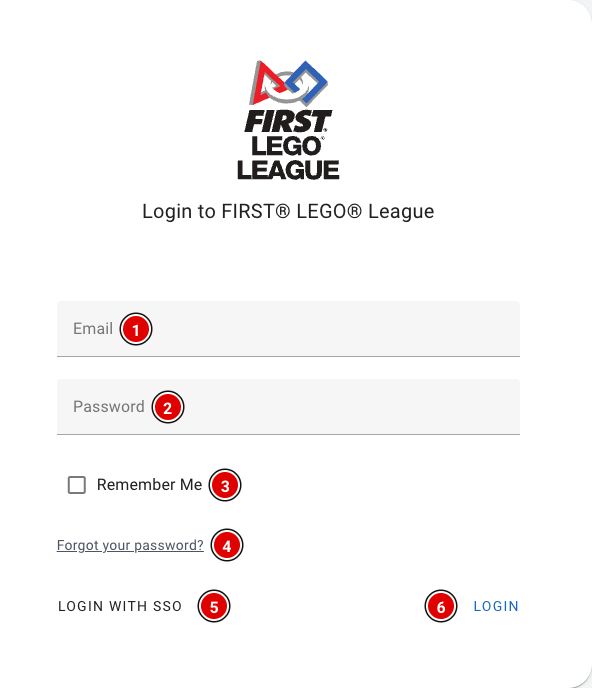
- Enter your e-mail address in Email (1) and your password in Password (2).
- Tick Remember Me (3) if you want to stay logged in on this device. Don't do this on a shared computer.
- Forgot your password? Click Forgot your password? (4) and you'll receive an e-mail to set a new password.
- Click Login (6).
After logging in you arrive at the dashboard. If there is no tournament yet and you are allowed to create tournaments, the Setup Wizard opens automatically (see the page The Setup Wizard).
FLLTools Unified Login
For volunteers who help at several (regional) finals, and for regional partners / operational partners, there is the FLLTools Unified Login. With it you log in to every event with the same details. Click Login with SSO (5) and log in on the page that opens. You are then taken back to FLLTools automatically.
Would you like to use this? Send an e-mail to thijs@flltools.com and you'll receive a login.
Finding your way around
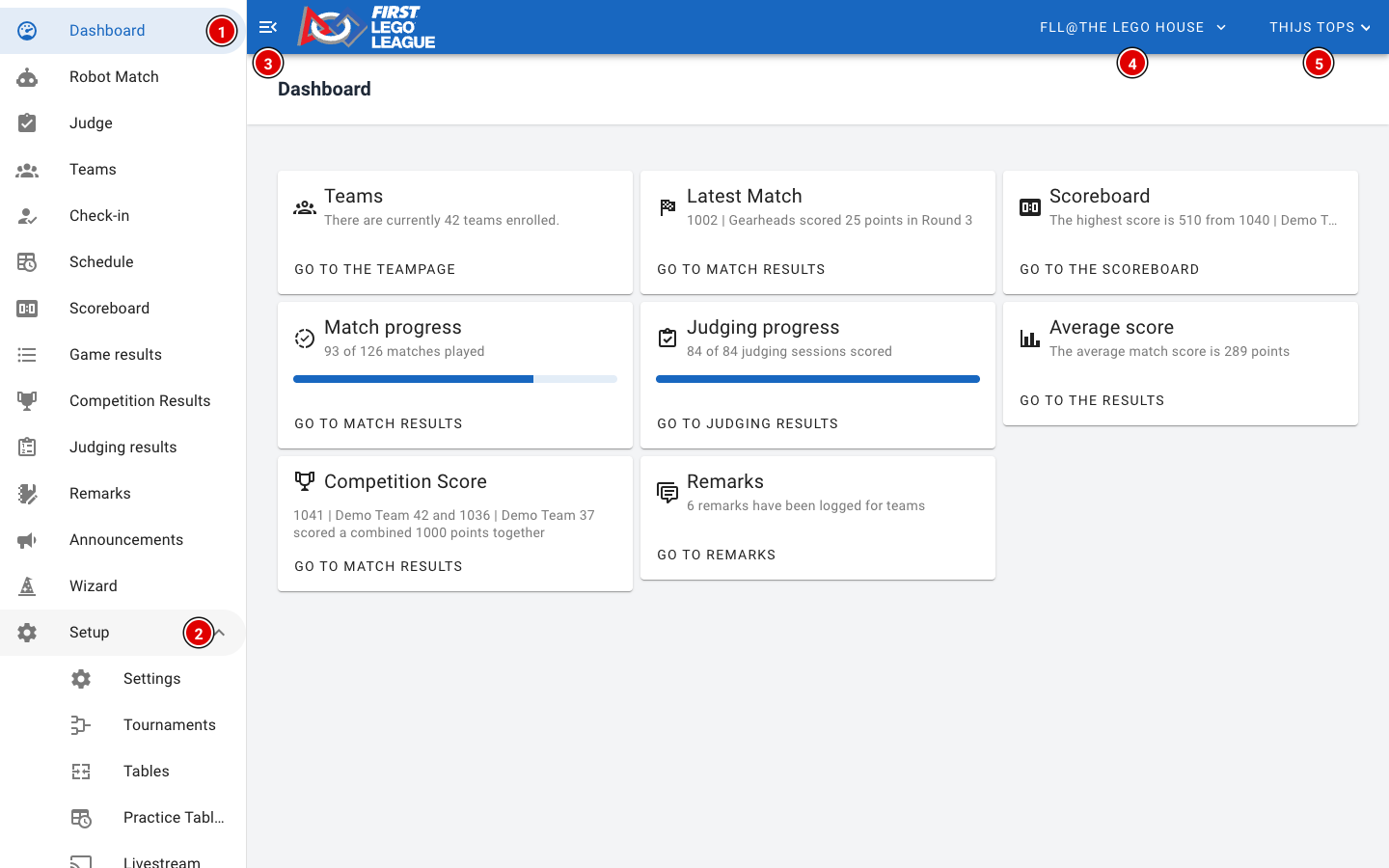
The Dashboard gives an overview of the event: the number of teams, the latest match, the highest score, how many matches and judging sessions have been entered, and how many remarks there are. The buttons on the cards take you straight to the matching page.
The user menu
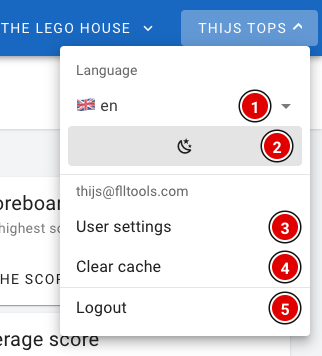
- Language (1): choose the language of the tool: English, Dutch, Belgian (Flemish) or French. The buttons and icons are in the same place in every language. This manual uses the English names.
- Dark mode (2): switch between a light and a dark view. Handy in a dark venue.
- User settings (3): your profile page, see below.
- Clear cache (4): wipes all data the tool has stored on this device. Only use this if the tool behaves strangely, for example after an update.
- Logout (5): log out on this device.
Be careful with Clear cache on a referee tablet! Results entered offline that haven't been sent yet are wiped too. First check that all results have been uploaded.
Your profile
Through User settings you reach your profile page.
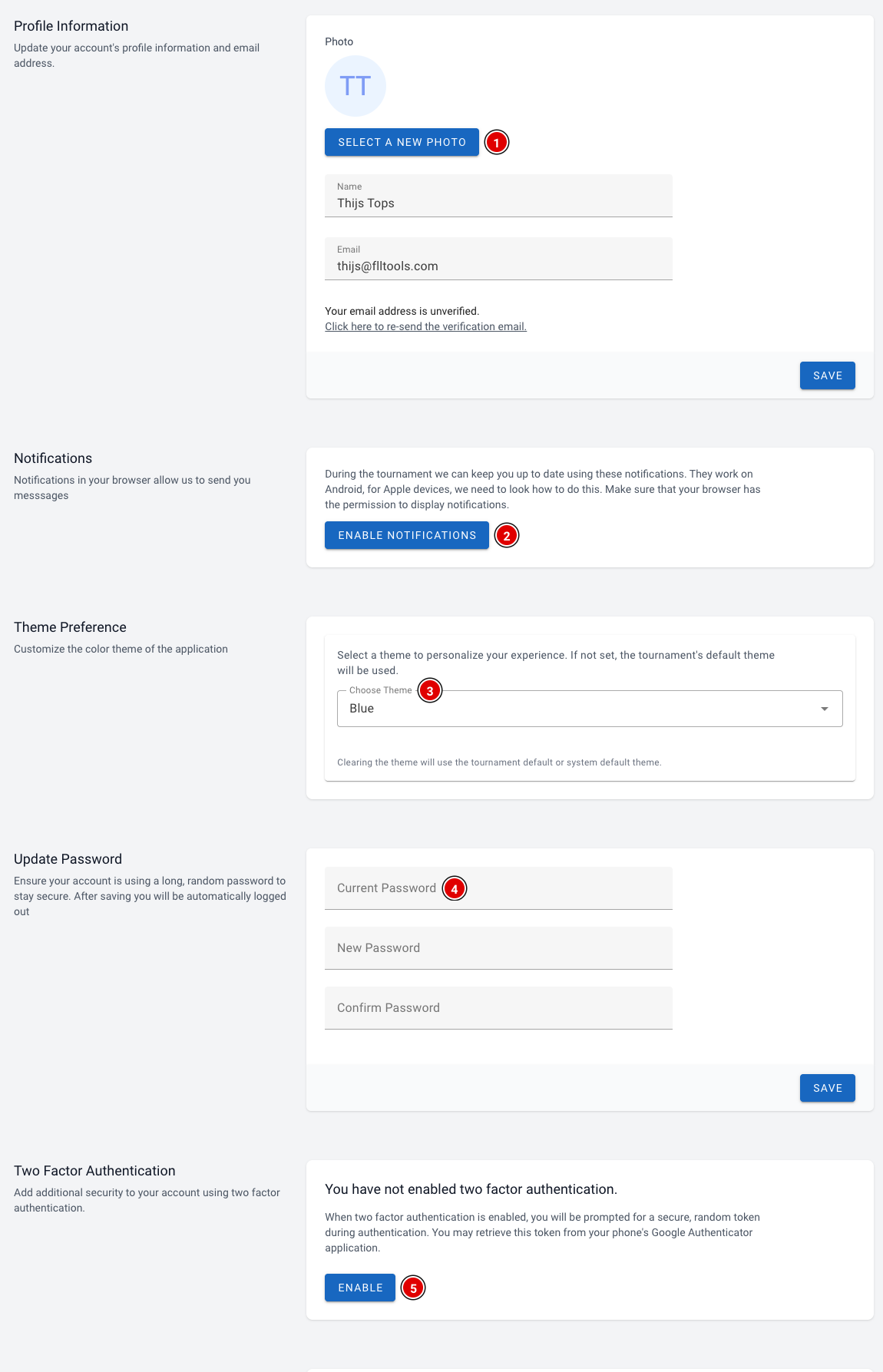
- Select a new photo (1): set a profile photo. Below it you can change your name and e-mail address. Click Save to save.
- Enable notifications (2): receive notifications in your browser during the event, for example announcements from the organisation. Your browser asks for permission; click allow. This works on Android and on a computer.
- Choose Theme (3): choose a colour theme for your account. If you don't choose one, the tournament's default theme is used.
- Update Password (4): change your password. After saving you are logged out automatically and log in again with your new password.
- Two Factor Authentication (5): switch on extra security. You scan a QR code with an authenticator app on your phone (for example Google Authenticator) and enter a code from that app when you log in. Keep the recovery codes you receive somewhere safe, for example in a password manager.
At the bottom of the page you see on which devices you are logged in. Logout all other devices logs you out everywhere except on the device you are using now. Handy if you have been logged in on a shared computer.